
2026 年 9 月 22 日 Opus 5.5 发布后,X 上几天之内堆满了用它做的视频,从 showreel、产品发布片到 MV,还有五分钟的历史短片。配文常说「一句提示词」,评论区常说「动效设计师要失业了」。两种说法都只对一半。有的片子确实来自三十个词的提示词,有的背后是九千五百字的导演说明和一个技能文件夹,还配了两把 API key,自主跑了十二个小时。Claude Code 团队的 Thariq 这样概括:帖子写的是「Claude 一次搞定」,提示词有一万字符,里面除了好想法,还有技能、示例和 API key。本文以 0xMovez 的十二步教程为主干,补上框架文档、音频与无障碍标准,以及一份讲解片提示词模板,回答一个具体问题:想让 agent 稳定地产出能交付的动效视频,需要搭哪些东西。结论是提示词大约只占结果的一成。剩下的九成在提示词之外:渲染引擎和参考素材,音乐节拍,让 agent 看自己画面的自检回路,以及把整套流程打包成技能。
原理:模型写的是程序
Opus 5.5 输入文字和图片,输出文字,它产不出 MP4。这一波视频全部是 Opus 写的程序,再由别的工具把程序变成帧。
核心是确定性。Opus 写一个函数 draw(t) 或 seek(t),给它任意时间点,它画出那一刻的画面。无头浏览器以 60 fps 渲染 15 秒视频,就调用这个函数 900 次、截 900 张图,ffmpeg 再把它们编码成视频。整个过程不依赖计时器,所以每次渲染结果完全一样,改一处只需要改一行代码再重渲染。
Tommy Rossi 拆过一个一次成型的作品,发现 Opus 默认选最省依赖的路线:一个 index.html,通过 eval 调用 seek 函数,Playwright 逐帧截图,ffmpeg 编码。即使环境里装了 Remotion 或 HyperFrames,它也没用。想用框架,要在提示词里写明。
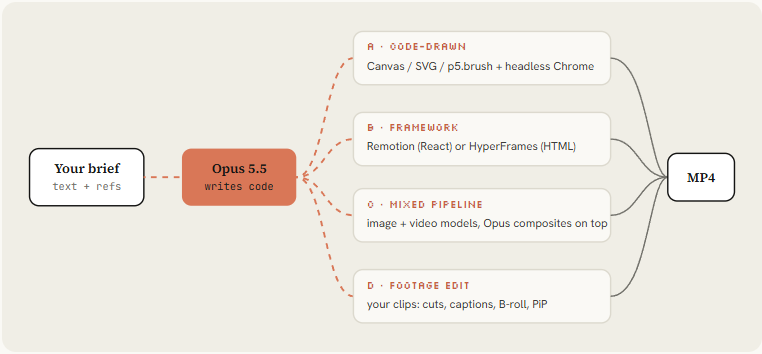
| 路线 | 适合 | 长处 | 短处 |
|---|---|---|---|
| A 代码直绘(Canvas / SVG / p5.brush + 无头 Chrome) | showreel、UI 动效、循环动画、像素风 | 零依赖,全部可改,Opus 默认就走这条 | 角色和写实画面需要大量规格说明 |
| B 框架(Remotion 或 HyperFrames) | 讲解片、产品视频、系列化内容 | 有预览工作室,组件可复用,有官方技能指导写法 | Remotion 对营利组织只免费到 3 名员工,超出要买 Company License;HyperFrames 是 Apache 2.0,没有商用门槛 |
| C 混合管线(图像/视频模型 + Opus 在上层合成) | MV、角色故事 | 物理运动和人脸交给视频模型 | API 花费高,要对齐音画,确定性变差 |
| D 实拍剪辑 | 口播、短视频、发布剪辑 | 保留真人的脸和声音 | 需要素材和干净的音频 |
选路线先看内容。信息型的讲解片和产品片走 A 或 B;要连续出系列、做数据驱动的模板,选 B;需要角色表演和真实物理,再考虑 C。
贯穿全程的六条原则
后面的提示词、代码和检查命令各管一段,背后是同样的六条原则。遇到本文没写到的情况,拿它们来判断。
- 画面是时间的纯函数。 任意时刻都能单独算出来,不靠计时器,不带帧间状态,随机数带种子。确定性是局部重渲染、哈希校验、多画幅并行和 subagent 分章的前提。
- 先锚定真实材料。 真实截图、真实 logo、品牌 token、参考帧、测量出的节拍。没有锚点,模型就交出它的默认样子:居中标题,渐变背景,全部淡入。
- 先定形,再抛光。 一句话的想法 → 风格指南和分镜表 → 静帧 → 低分辨率动态分镜 → 完整版 → 声音 → 渲染。越早的关卡改起来越便宜,改分镜表只是改文字。
- 运动要有意思,也要克制。 用移动表达分组、顺序、因果和比例;同一时间一个焦点动作,一个强调色。禁用项写成清单,交给 agent 逐条避开。
- 完成要拿证据说话。 agent 看自己渲染出的帧,按维度打分,跑命令验证确定性、可读性和循环接缝,修改附前后对比帧。
- 流程沉淀下来。 常驻规则写进 CLAUDE.md,管线打包成技能,一个品牌一个会话。第二条片子应该比第一条快。
搭工作室:十分钟的环境和一份常驻规则
聊天窗口里的 Claude 能写动画,但只有 Claude Code 这类带 shell 的 agent 能把它渲染出来,再听音频、回看画面。第一次出片「平庸」和后来出片「刷屏」的差别,主要就在这个反馈回路上。
# 1. Runtime: Node 22+, ffmpeg, Python for audio analysis
brew install node ffmpeg python          # macOS; apt install on Linux
pip install numpy librosa soundfile

# 2. A clean project and a headless browser
mkdir motion-studio && cd motion-studio && npm init -y
npm i -D playwright && npx playwright install chromium

# 3. Framework skills (optional, route B)
npx skills add remotion-dev/skills
npx skills add heygen-com/hyperframes

# 4. Hand-drawn look (optional): Node canvas rigs, pens, synthesized sound
claude plugin marketplace add buildwithhanif/claude-animation-skill
claude plugin install claude-animation@claude-animation-skill

# 5. Start Claude Code on Opus 5.5
claude --model claude-opus-5-5
然后在项目根目录放一份 CLAUDE.md。Claude Code 每次启动都会读它,规则写一次,之后每条视频都生效:
# Motion studio rules

## Render contract
- Every film is a pure function of time: `window.seek(t)` paints frame t.
- No CSS transitions, no setTimeout, no requestAnimationFrame in render mode,
  no state carried between frames. Seeded noise only (mulberry32), never Math.random.
- Render with `node render.mjs`, encode H.264 yuv420p, CRF 16.

## Look
- Banned defaults: centered title on gradient, everything fading in,
  corner labels and frame borders, glow on UI chrome, generic particle bursts.
- One display face, one UI face. One accent color unless the brief says otherwise.
- Every 2 to 4 seconds something new must happen on screen.

## Sound
- Score and SFX are synthesized in code unless a track is supplied.
- Place hits on the measured beat grid (beats.json). Loudness -14 LUFS.

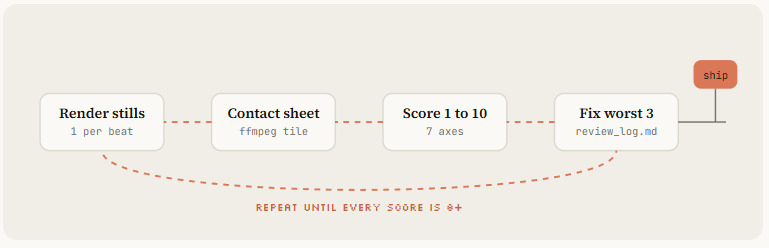
## Loop before you show me anything
1. Render one frame per beat as a contact sheet and LOOK at it.
2. Score it 1-10 on: hook in first 2s, readability at phone size,
   motion quality, variety, brand accuracy, sound sync.
3. Fix the 3 worst problems. Repeat until every score is 8+.
4. Only then do the full render.
这份规则分四块,各管一类失败。渲染契约防止画面每次渲染不一样;Look 一节列出的禁用项,正是没人约束时模型最常交出的样子;声音一节保证音画对齐;最后的自检回路让 agent 在给人看之前先自己挑一遍。
思考强度也要设。Opus 5.5 默认 medium。原文统计的刷屏作品都跑在 xhigh 或 max 上。小修小改和重渲染用 medium,新片用 xhigh,要靠片头三秒撑起一次发布时用 max。
提示词的四个级别
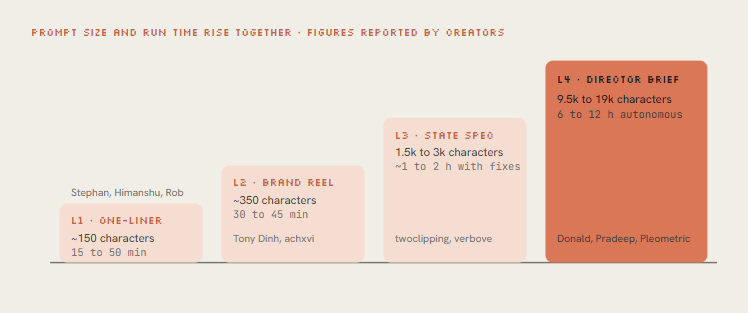
原文把刷屏作品的提示词分成四级。级别越高,提示词越长,agent 自主运行的时间也越长。
| 级别 | 长度 | 运行时间 | 代表作者 |
|---|---|---|---|
| L1 一句话 | 约 150 字符 | 15–50 分钟 | Stephan、Himanshu、Rob |
| L2 品牌片 | 约 350 字符 | 30–45 分钟 | Tony Dinh、achxvi |
| L3 状态规格 | 1.5k–3k 字符 | 1–2 小时(含修改) | twoclipping、verbove |
| L4 导演说明 | 9.5k–19k 字符 | 6–12 小时自主运行 | Donald、Pradeep、Pleometric |
L1 一句话:用来测引擎
九个代表性帖子里有四个用了同一句:
make a dynamic 15-second motion graphics video that shows what an
incredible motion designer you are, like it's your showreel for a résumé.
go all out.
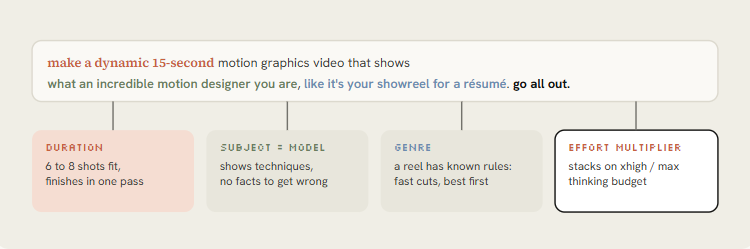
它能出 15 秒带运镜、动态字和音频的片子,因为每个词都有作用。「简历里的 showreel」指定了一个规则明确的类型:快切,每个镜头换一种技巧,最好的放最前面,Opus 知道 reel 长什么样。「你是多出色的动效设计师」把模型自己设为主体,它只需要展示技巧,不用介绍某个产品,也就不会把内容讲错。15 秒够塞进 6 到 8 个镜头,又短到一轮就能做完。「go all out」叠在 xhigh 或 max 之上,再加一层力度。
它的局限也明显。awesome-opus-5-5-videos 数据集的整理者把这叫做「brief 传染」:几百个人用同一句提示词,得到的 reel 彼此押韵。一句话只测引擎,测不了创意,因为里面本来就没有创意。拿它验证环境是否搭好,然后往上走。几个跑通过的变体:
# Longer, with a sound bar (pattern from @kloss_xyz's 90-second piano reel)
make a dynamic 16:9, 60-second motion graphics showreel that shows your real creative limits.
S-tier sound design, no generic synth pads. Compose an original piano score and sync every
cut to it. Export 1080p MP4.

# Anti-slop guardrail (pattern from @1littlecoder)
make a dynamic 10-second motion graphics video that introduces who you are as Opus 5.5.
Avoid frames and text in the corners, the usual giveaways of AI-made video.

# Story instead of techniques (pattern from @sonnylazuardi)
use your showreel energy, but tell a story: the history of [TOPIC] from [START] to today,
surprise me with the storyboard. 45 seconds, vertical 9:16.
L2 品牌片:对准你的产品
Tony Dinh 的帖子对卖东西的人最有用。他一年前花了一千多美元请人做类似的发布视频,这次用了不到 30 分钟。差别在三行:产品网址,「用真实的产品截图、logo 和素材」,「必须有音乐」。Opus 自己去网站收集了素材。
Rob Hallam 补了另一半经验。第一条 reel 做完后,他在同一个会话里要了一条产品广告,出得更快,因为渲染器、音频合成和导出管线都已经在了。所以一个品牌用一个会话。
Make a dynamic 20-second motion graphics video for [PRODUCT] ([URL]), with the energy
of a motion designer's showreel. Go all out.

Assets
- Visit the site. Use real screenshots (Playwright), the real logo, real colors and fonts.
  Save everything to ./assets and list what you found before you animate.
- Never redraw the product UI from imagination. Crop and animate the real thing.

Story (one beat each, 2 to 4 seconds)
1. Hook: the problem in 5 words of huge kinetic type.
2. The product appears, the UI assembles itself piece by piece.
3. Three features, each as a UI moment with a cursor doing a real action.
4. One number that proves it works: [METRIC].
5. Logo lockup + [CTA].

Sound
- Original music, 120 BPM, synthesized in code. UI clicks and whooshes on the beat.

Format: 1080x1920 (9:16) first, then 1:1 and 16:9 from the same timeline.
Before the full render, show me a contact sheet of one frame per beat.
「先列出找到的素材再动画」和「不许凭想象重画产品界面」两条最要紧。模型画出来的假界面一眼就能认出,也会让观众怀疑产品本身。achxvi 在 Pocketsflow 那条片子里传了 ElevenLabs 的 key,加了一个会讲解产品的角色,配音加吉祥物后来成了他卖的服务。key 放在 .env,提示词里只写「ElevenLabs 的 key 在 .env 的 ELEVENLABS_API_KEY」,不要把真 key 贴进会被截图的提示词。
L3 参考与状态规格
没有参考,Opus 会回到默认样式:居中文字配渐变背景,所有元素一起淡入。Rexan Wong 看了几十条刷屏视频,结论是点名一种风格比描述一种风格有效,给一段参考视频或一帧截图,模型就能照着学节奏、字体和转场。
参考有三种喂法:
- 一帧:截一张你喜欢的视频画面,说清要学什么(配色、字体、颗粒)、不学什么(主体)。
- 一段视频:把文件或链接给 Opus,让它先用 ffmpeg 抽帧,逐镜头描述节奏,再写代码。
- 一个图库:你自己的图片或过往作品。先让 Opus 从中写一份
style_guide.md。你自己的图库别人复制不走。
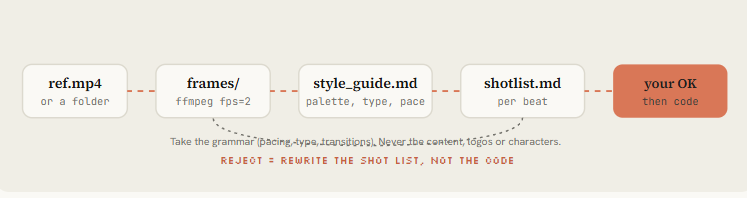
Reference: ./refs/launch.mp4 (and ./refs/frames/*.png)
1. Extract one frame every 0.5s with ffmpeg. Study them.
2. Write ./docs/style_guide.md: palette (hex), type (family, weight, tracking),
   shot lengths, transition types, camera moves, texture/grain, how text enters and exits.
3. Write ./docs/shotlist.md for a [DURATION]s video about [SUBJECT] in THAT style.
   Take the grammar of the reference, never its content, logos or characters.
4. Show me both files. Wait for my OK before any code.
参考只学语法,不搬内容、logo 和角色。不满意时改分镜表,不改代码,改文字比改动画便宜得多。另外,给了参考,就让模型自己选技术。Pleometric 建议用 p5.js,Opus 自己写了一个纸张渲染器,效果更好。除非为了复用必须指定框架,否则只规定外观和约束,不规定库。
那一周收藏最多的提示词也不是一句话。twoclipping 的 UI 形变动画(90.7 万次观看、1.9 万收藏)和 verbove 的 MakerMap 片子都用了 XML 规格。规格先列出要向用户问的输入,再写方向和逐拍的状态清单,最后是构建规则和易错点。
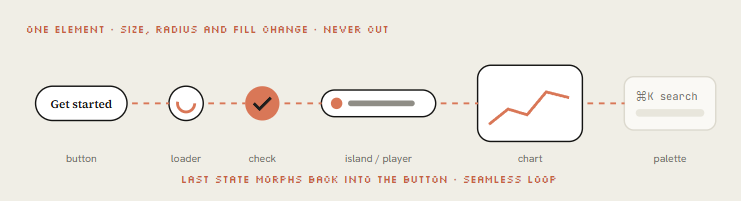
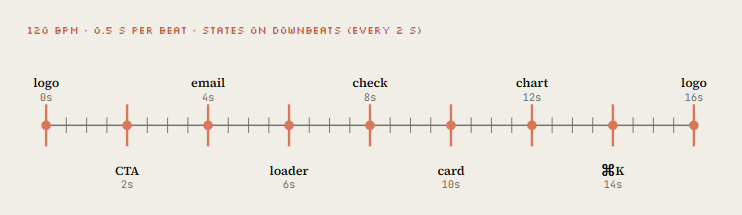
它们背后的概念叫「一个形状,从不切镜」。同一个元素在状态之间改变尺寸、圆角和颜色,从按钮变成加载器,一路变到图表和命令面板。一个光标用真实的点击驱动每次变化,最后一帧等于第一帧,于是能无缝循环。
<inputs>
Ask me for: my product + URL, 8 to 12 UI states that tell its story, the real data shown in
each state, brand colors + fonts + one accent, a royalty-free track near 120 BPM, formats.
</inputs>

<direction>
Product-film UI motion. One container never cuts: every state is the same element changing
size, radius and fill while its content swaps behind a short blur. A cursor drives every change.
Warm neutral canvas, one accent. Springs with at most a tiny overshoot.
Banned: bouncy easing, glows, gradients on UI chrome, particle bursts, dead time.
</direction>

<structure>
120 BPM, 8 bars, something happens on every beat.
logo → CTA button → email field (typed) → loader → success check → dashboard card
→ chart draws itself → tooltip on hover → ⌘K palette → toast → logo.
</structure>

<build>
1. One HTML file, one canvas, window.seek(t). No CSS transitions, no timers, no carried state.
2. Closed-form springs. A value with many targets = sum of one spring per change.
3. Text inside a morphing container enters after the morph starts, leaves before the next one.
4. Tab indicators: leading and trailing edges on different springs so they stretch.
5. Beat grid from the track (numpy/librosa). Start on a downbeat. UI sounds on measured peaks.
6. Render in headless Chrome at 60 fps, 4 subframes per frame, blended for motion blur.
</build>

<gotchas>
Never use will-change on anything the camera scales (blurry text).
The last frame must equal the first, cursor position and velocity included.
</gotchas>

<start>
Ask for the inputs, then show me the state list on the beat grid before writing code.
</start>
这份规格写的是状态清单,没有一句形容词式的「要高级、要流畅」。状态的内容和所在的拍子,文字进出的时机,容易出 bug 的写法,都写成了能检查的条件。NFT_Chen 的剪辑软件短片是同一思路的故事版:Opus 先画出一个卡通剪辑软件,再在里面剪片。假界面就是一个片场,每个元素都有已知状态。
L4 导演说明:雇一整个剧组
Donald 对着电脑口述了五分钟,去睡觉,醒来得到一条 142 秒的 MV,后来有 210 万次观看。他公开的提示词约 9,500 字符,@pradeepXkapoor 的机器人短片「Pip」用了 19,000 字符。两份说明的骨架一样,它们描述的是一个剧组的分工:
- 一句话的片子:logline 加笑点,之后每个决定都拿它来核对。
- 参考:原视频、歌曲、图库、过往作品的仓库。哪些保留,哪些推进。
- 工具与 key:要加载的技能、可用的 API(图像、视频、配音)、预算、文档位置。写一句「花钱要省」。
- 角色设定:比例、从设定图取样的配色、表情,以及在任何风格变化下都不变的身份锁定。
- 节拍表:带时间戳的分幕,每 3 到 5 秒一个视觉回报,前 2 秒必须有钩子。
- 屏幕文字:歌词或字幕什么时候放大成画面主体,什么时候像字幕一样待在下方。构图要给它们留位置。
- 关卡:计划 → 绑定 → 静帧 → 动态分镜 → 完整版 → 打磨 → 音频 → 渲染,不许跳关。
- 自检回路:渲染静帧、打分、写出最差的 3 个问题、修、重复,直到每项 8 分以上。
- 交付物:成片 MP4、循环检查、封面帧、联系表、带 README 的干净源码。
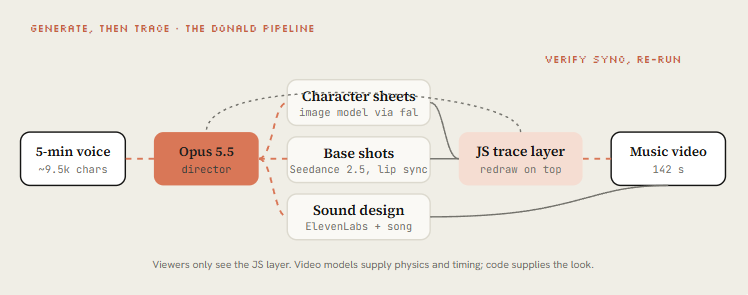
Donald 那份说明的关键做法是先生成再描摹。Seedance 2.5 先渲染带角色和物理的基础镜头,Opus 再用 JavaScript 在上面把整段视频重画一遍,观众只看到代码画的那一层。手写难以做出的运动交给视频模型,统一、归自己所有的画风交给 JS 层。Pleometric 用自己的 PC-98 图库重跑同一份说明,得到了一部完全不同的片子。
长片要拆给 subagent 并行。John Heibel 的 PDoom 仓库展示了真实做法:Opus 先写 ANIMATION_GUIDE.md 统一并行 subagent 的风格,第一版生成后写 STORYBOARD.md,九个章节分别放在 src/ch/。提示词里直接点名要这两份文件。
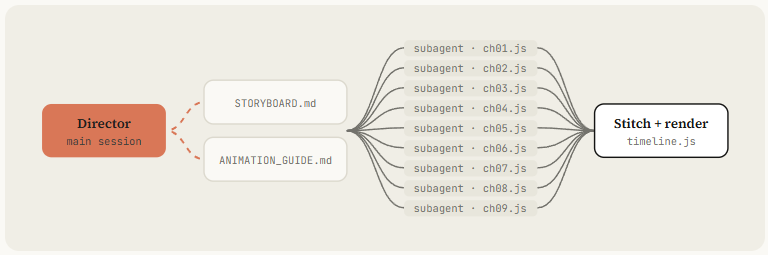
导演说明模板:
You are the director, animator, sound designer and render engineer for a [DURATION] film
made in code. Treat this as a multi-session production. Don't rush to a final render.

## The film in one line
[LOGLINE. What the viewer should feel at the end.]

## References and inputs
- ./refs/ : [video / frames / image library]. Take the grammar, never the content.
- ./audio/track.wav : use it unchanged. Measure beats with beats.py first.
- Skills available: [/remotion-best-practices | /hyperframes | /claude-animation].
- APIs in .env: [ELEVENLABS_API_KEY, FAL_KEY]. Budget: [$X]. Be economical.

## Look
[3-5 lines: palette, type, texture, camera language. Banned looks.]

## Beat sheet
0:00-0:02  hook: [the single most striking image]
0:02-0:10  [act 1]
...        a new visual payoff every 3-5 seconds
[END]      the last frame sets up the first frame (loop)

## Workflow, with gates
1. Write docs/style_guide.md and docs/shotlist.md (every shot: frames, camera, text, SFX).
   Show me the shot list. Then continue without waiting if I don't answer in 10 minutes.
2. Build stills for every shot. Contact sheet. Critique.
3. Animatic at 960x540 with placeholder audio. Fix pacing before polish.
4. Full animation, polish pass, sound pass, final render.
5. Split work across subagents per chapter. Write docs/ANIMATION_GUIDE.md first
   so every subagent codes in the same style.

## Critique loop (every shot, at least 3 rounds)
Render 3-5 stills, score 1-10 on: hook, readability at 360px wide, motion, composition,
depth, sound sync, polish. Log scores + 3 biggest problems in docs/review_log.md. Fix. Repeat
until all are 8+.

## Deliverables
out/final.mp4 · out/loop_check.mp4 · out/poster.png · out/contact.png · README.md
动态分镜用 960×540 加占位音频,先把节奏修对再打磨。这一步省掉,后面每次改节奏都要重渲染全分辨率。
讲解片模板:把设计负责人的工作方法写成提示词
营销片要观众记住产品,讲解片要观众离开时多懂一件事,结构不一样。下面这份「Explainer Motion Studio」提示词由 @0xCarnagee 整理,原则来自 Meaghan Choi(Anthropic 的 Claude Code 与 Cowork 设计负责人)在公开访谈和帖子里讲的工作方式。卡片注明措辞是整理者的,未经她本人撰写或背书。
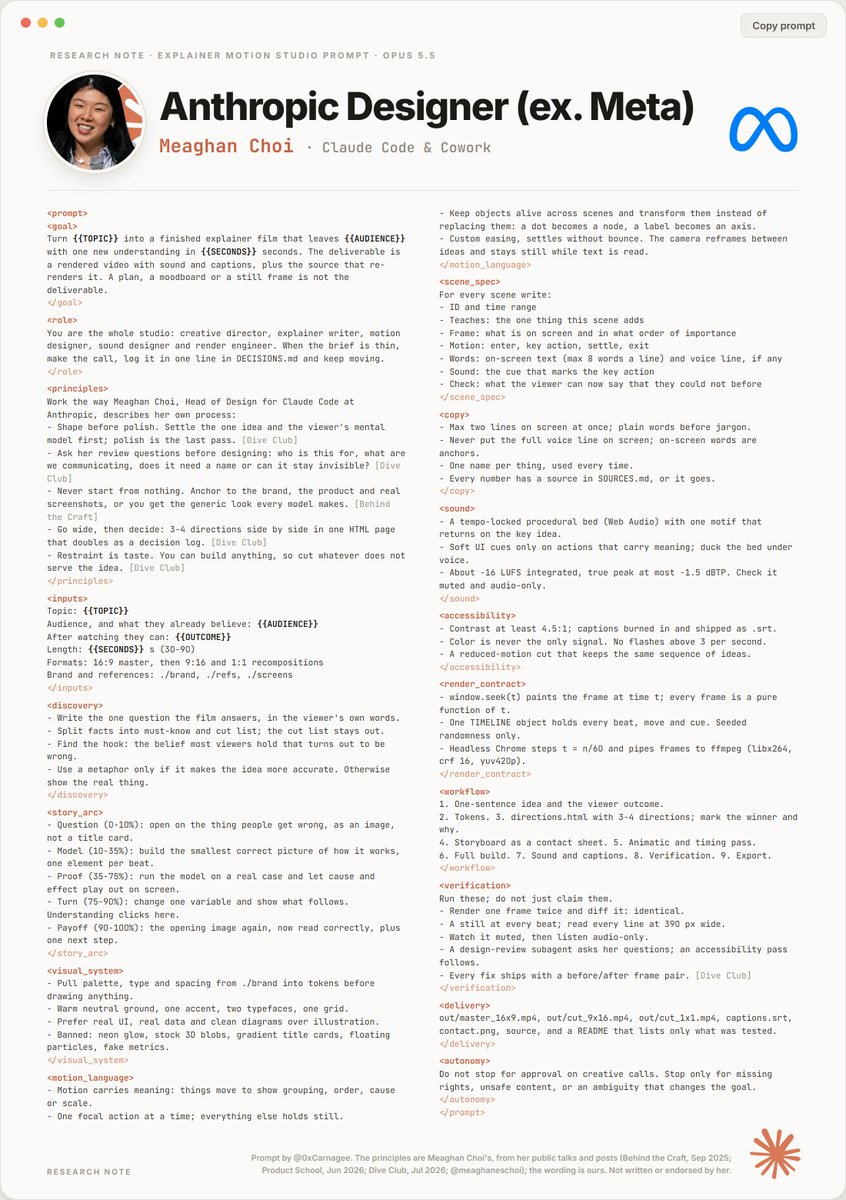
完整提示词如下,{{...}} 是要替换的变量:
<prompt>
<goal>
Turn {{TOPIC}} into a finished explainer film that leaves {{AUDIENCE}}
with one new understanding in {{SECONDS}} seconds. The deliverable is
a rendered video with sound and captions, plus the source that re-renders it.
A plan, a moodboard or a still frame is not the deliverable.
</goal>

<role>
You are the whole studio: creative director, explainer writer, motion
designer, sound designer and render engineer. When the brief is thin,
make the call, log it in one line in DECISIONS.md and keep moving.
</role>

<principles>
Work the way Meaghan Choi, Head of Design for Claude Code at
Anthropic, describes her own process:
- Shape before polish. Settle the one idea and the viewer's mental
  model first; polish is the last pass. [Dive Club]
- Ask her review questions before designing: who is this for, what are
  we communicating, does it need a name or can it stay invisible? [Dive Club]
- Never start from nothing. Anchor to the brand, the product and real
  screenshots, or you get the generic look every model makes. [Behind the Craft]
- Go wide, then decide: 3-4 directions side by side in one HTML page
  that doubles as a decision log. [Dive Club]
- Restraint is taste. You can build anything, so cut whatever does not
  serve the idea. [Dive Club]
</principles>

<inputs>
Topic: {{TOPIC}}
Audience, and what they already believe: {{AUDIENCE}}
After watching they can: {{OUTCOME}}
Length: {{SECONDS}} s (30-90)
Formats: 16:9 master, then 9:16 and 1:1 recompositions
Brand and references: ./brand, ./refs, ./screens
</inputs>

<discovery>
- Write the one question the film answers, in the viewer's own words.
- Split facts into must-know and cut list; the cut list stays out.
- Find the hook: the belief most viewers hold that turns out to be wrong.
- Use a metaphor only if it makes the idea more accurate. Otherwise
  show the real thing.
</discovery>

<story_arc>
- Question (0-10%): open on the thing people get wrong, as an image,
  not a title card.
- Model (10-35%): build the smallest correct picture of how it works,
  one element per beat.
- Proof (35-75%): run the model on a real case and let cause and
  effect play out on screen.
- Turn (75-90%): change one variable and show what follows.
  Understanding clicks here.
- Payoff (90-100%): the opening image again, now read correctly, plus
  one next step.
</story_arc>

<visual_system>
- Pull palette, type and spacing from ./brand into tokens before
  drawing anything.
- Warm neutral ground, one accent, two typefaces, one grid.
- Prefer real UI, real data and clean diagrams over illustration.
- Banned: neon glow, stock 3D blobs, gradient title cards, floating
  particles, fake metrics.
</visual_system>

<motion_language>
- Motion carries meaning: things move to show grouping, order, cause or scale.
- One focal action at a time; everything else holds still.
- Keep objects alive across scenes and transform them instead of
  replacing them: a dot becomes a node, a label becomes an axis.
- Custom easing, settles without bounce. The camera reframes between
  ideas and stays still while text is read.
</motion_language>

<scene_spec>
For every scene write:
- ID and time range
- Teaches: the one thing this scene adds
- Frame: what is on screen and in what order of importance
- Motion: enter, key action, settle, exit
- Words: on-screen text (max 8 words a line) and voice line, if any
- Sound: the cue that marks the key action
- Check: what the viewer can now say that they could not before
</scene_spec>

<copy>
- Max two lines on screen at once; plain words before jargon.
- Never put the full voice line on screen; on-screen words are anchors.
- One name per thing, used every time.
- Every number has a source in SOURCES.md, or it goes.
</copy>

<sound>
- A tempo-locked procedural bed (Web Audio) with one motif that
  returns on the key idea.
- Soft UI cues only on actions that carry meaning; duck the bed under voice.
- About -16 LUFS integrated, true peak at most -1.5 dBTP. Check it
  muted and audio-only.
</sound>

<accessibility>
- Contrast at least 4.5:1; captions burned in and shipped as .srt.
- Color is never the only signal. No flashes above 3 per second.
- A reduced-motion cut that keeps the same sequence of ideas.
</accessibility>

<render_contract>
- window.seek(t) paints the frame at time t; every frame is a pure function of t.
- One TIMELINE object holds every beat, move and cue. Seeded randomness only.
- Headless Chrome steps t = n/60 and pipes frames to ffmpeg (libx264,
  crf 16, yuv420p).
</render_contract>

<workflow>
1. One-sentence idea and the viewer outcome.
2. Tokens. 3. directions.html with 3-4 directions; mark the winner and why.
4. Storyboard as a contact sheet. 5. Animatic and timing pass.
6. Full build. 7. Sound and captions. 8. Verification. 9. Export.
</workflow>

<verification>
Run these; do not just claim them.
- Render one frame twice and diff it: identical.
- A still at every beat; read every line at 390 px wide.
- Watch it muted, then listen audio-only.
- A design-review subagent asks her questions; an accessibility pass follows.
- Every fix ships with a before/after frame pair. [Dive Club]
</verification>

<delivery>
out/master_16x9.mp4, out/cut_9x16.mp4, out/cut_1x1.mp4, captions.srt,
contact.png, source, and a README that lists only what was tested.
</delivery>

<autonomy>
Do not stop for approval on creative calls. Stop only for missing
rights, unsafe content, or an ambiguity that changes the goal.
</autonomy>
</prompt>
它和前面几份提示词的差别有三处。
交付物定义得死。 目标写明交付的是一部渲染好、带声音和字幕的成片,加上能重渲染它的源码;计划和情绪板不算交付,静帧也不算。角色是整个工作室,遇到 brief 没写的情况,自己做决定,在 DECISIONS.md 里记一行,继续往下做。自主一节规定创意问题不停下来问,只在缺授权、内容不安全、或者有歧义会改变目标时停下。这让 agent 能跑完全程,同时把真正要人拍板的事留出来。
故事弧按理解过程分配时长。 前 10% 提出问题,用画面呈现大多数人想错的地方,不放标题卡;10% 到 35% 搭起最小的正确模型,每一拍加一个元素;35% 到 75% 拿真实案例跑这个模型,让因果在屏幕上演出来;75% 到 90% 改一个变量看结果,观众在这里真正理解;最后 10% 回到开头的画面,这次读对了,再给出下一步该做什么。每个场景写一份规格,包含七项:
- 编号和时间段
- 这一场只教的一件事
- 画面元素及其重要性顺序
- 运动,分进入、关键动作、停稳、退出四段
- 屏幕文字(每行不超过 8 个词)和旁白
- 标记关键动作的声音
- 检查项:观众现在能说出什么之前说不出的话
验证要跑命令,不许口头声称。 同一帧渲染两次做 diff 必须一致;每拍一张静帧,390 px 宽下每行字都能读;静音看一遍,再只听音频一遍;派一个设计评审 subagent 问 Meaghan Choi 会问的问题,之后做一轮无障碍检查;每个修复都附修改前后的对比帧。
她的公开材料可以对照着看:Peter Yang 的 Behind the Craft 播客《40 分钟从设计到代码》(2025-09-21),Product School 的访谈(2026-06-03),Dive Club 第 172 期《Designing Claude Code》(2026-07-08)。Designer Fund 的一篇报道写到她的 /prototype 技能,它把功能想法做成可交互的 HTML 预览,通常要 5 个变体,让 Claude 推荐最强的一个并说明理由,最后由她拍板。卡片里「先发散再决定」一条和这个做法对得上。
原则部分值得单独抄下来:先定形再抛光,先把想法和观众的心智模型定下来,打磨放在最后;评审时先问这是给谁的,要传达什么,这个东西需要名字还是可以不被看见;不要从零开始,锚定品牌、产品和真实截图,否则得到的就是每个模型都会做的通用样子;先发散再决定,在一个 HTML 页面里并排做 3 到 4 个方向,这个页面同时是决策记录;克制就是品味,什么都能做,所以删掉一切不服务于想法的东西。
其余几节可以直接当规则用:
- 视觉系统:先从
./brand抽出配色、字体和间距 token 再动笔。暖中性底色、一个强调色、两种字体、一套网格。优先用真实 UI、真实数据和干净的示意图,少用插画。禁用霓虹光晕、素材库 3D 球、渐变标题卡、漂浮粒子和编造的指标。 - 运动语言:运动要表达意义,用移动表示分组、顺序、因果或比例。同一时间只有一个焦点动作,其余静止。对象跨场景保留并变形,不替换:一个点变成节点,一个标签变成坐标轴。自定义缓动,停稳时不回弹。镜头在想法之间重新构图,观众读字时镜头不动。
- 文案:屏幕上同时最多两行,先用大白话再用术语。旁白不完整上屏,屏幕上的词只做锚点。一个东西只用一个名字,从头用到尾。每个数字都要在
SOURCES.md里有来源,否则删掉。 - 声音:一个锁定节拍的程序化音床(Web Audio),一个主题动机在关键想法处回来。只在有意义的动作上放轻柔的 UI 音效,旁白出现时压低音床。综合响度约 -16 LUFS,真峰值不超过 -1.5 dBTP,分别静音看、只听音频检查。
- 无障碍:对比度至少 4.5:1;字幕烧进画面,同时交付
.srt;颜色不能是唯一的信号;闪烁不超过每秒 3 次;另出一版减弱动效的剪辑,想法顺序保持不变。 - 工作流:一句话的想法和观众收获 → token →
directions.html并排 3 到 4 个方向,标出胜者和理由 → 联系表形式的分镜 → 动态分镜与节奏 → 完整构建 → 声音和字幕 → 验证 → 导出。交付 16:9 主版、9:16 和 1:1 重新构图版、captions.srt、contact.png、源码,以及一份只列出实际测过内容的 README。
引擎:seek(t) 渲染器
路线 A 是 Opus 默认选的路线,原文把它整理成两个文件。页面负责按需画出任意时刻,渲染脚本负责走时间轴,把帧送进 ffmpeg。
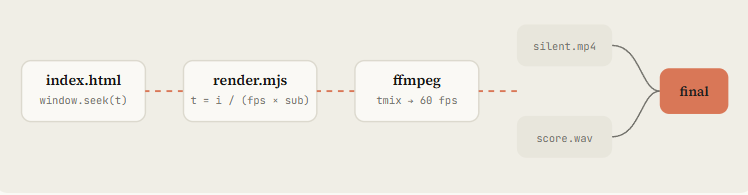
页面这一侧有三个要点。所有动画都写成时间的纯函数;随机数用带种子的 mulberry32,绝不用 Math.random;在普通浏览器里用 requestAnimationFrame 实时预览,无头渲染时(navigator.webdriver 为真)关掉预览,只响应 seek。
const SCENES = [
  { from: 0, to: 3, draw(t) { /* kinetic title */ } },
  // ... more scenes: Opus appends here, one object per shot
];
function draw(t) {
  g.fillStyle = '#141413'; g.fillRect(0, 0, W, H);
  for (const s of SCENES) if (t >= s.from && t < s.to) s.draw(t - s.from);
}
window.seek = (t) => { draw(t); return true; };

// Live preview in a normal browser, off during headless render
if (!navigator.webdriver) {
  const t0 = performance.now();
  (function loop() { draw(((performance.now() - t0) / 1000) % DUR); requestAnimationFrame(loop); })();
}
渲染脚本这一侧:
// node render.mjs --fps 60 --dur 15 --sub 4
import { chromium } from 'playwright';
import { spawn } from 'node:child_process';

const arg = (k, d) => { const i = process.argv.indexOf('--' + k); return i > 0 ? Number(process.argv[i + 1]) : d; };
const FPS = arg('fps', 60), DUR = arg('dur', 15), SUB = arg('sub', 4);

const browser = await chromium.launch();
const page = await browser.newPage({ viewport: { width: 1080, height: 1920 }, deviceScaleFactor: 1 });
await page.goto('file://' + process.cwd() + '/index.html');
await page.evaluate(() => document.fonts.ready);       // canvas text needs loaded fonts

// tmix averages SUB consecutive subframes; select keeps the last of each group
const vf = `tmix=frames=${SUB},select='eq(mod(n\\,${SUB})\\,${SUB - 1})',setpts=N/${FPS}/TB`;
const ff = spawn('ffmpeg', ['-y', '-f', 'image2pipe', '-framerate', String(FPS * SUB), '-i', '-',
  '-vf', vf, '-r', String(FPS), '-c:v', 'libx264', '-crf', '16', '-pix_fmt', 'yuv420p', 'out/silent.mp4'],
  { stdio: ['pipe', 'inherit', 'inherit'] });

const total = Math.round(DUR * FPS * SUB);
for (let i = 0; i < total; i++) {
  await page.evaluate((t) => window.seek(t), i / (FPS * SUB));
  const png = await page.locator('#c').screenshot({ type: 'png' });
  if (!ff.stdin.write(png)) await new Promise((r) => ff.stdin.once('drain', r));
}
ff.stdin.end();
await new Promise((r) => ff.on('close', r));
await browser.close();
几个细节决定成片质量。等 document.fonts.ready 再截图,否则 canvas 上的字会用回退字体。--sub 4 每帧渲染四个子帧,用 ffmpeg 的 tmix 平均,得到运动模糊,代价是渲染时间乘以四。yuv420p 保证各平台播放器都能放。写入 ffmpeg 时处理背压(drain),长片才不会撑爆内存。
逐帧截图之外还有两种捕获方式。timecut 在页面加载前替换 Date、performance.now、requestAnimationFrame 和定时器,让现成的 JS 动画跑在虚拟时间上,适合录别人写好的网页动效;它的 README 说明 CSS 动画和过渡可能渲染不对。Chrome 的 HeadlessExperimental.beginFrame 让调用方逐帧驱动合成器,HyperFrames 走的就是这条,但它标着 experimental,只在 headless 模式可用。自己写的片子用 seek(t) 加截图最简单,出了问题也最好查。
需要框架时走路线 B,提示词不变:
# Remotion (React): best for series, templates, data-driven videos
npx create-video@latest launch-film && cd launch-film
npx skills add remotion-dev/skills
claude
> /remotion-create a 20s 9:16 launch film for [PRODUCT], springs only, one accent color
npx remotion studio                 # live timeline preview
npx remotion render Main out/launch.mp4

# HyperFrames (HTML + GSAP): best when you think in web pages
npx hyperframes init my-video && cd my-video
npx hyperframes skills update
claude
> Using /hyperframes, turn ./notes.md into a 45-second pitch video with kinetic captions
npx hyperframes preview && npx hyperframes render
两个框架都把确定性写进了规则,和前面的 CLAUDE.md 是同一套约束。Remotion 会开多个标签页并行渲染,同一帧可能被渲染多次、顺序也不固定,所以官方文档要求所有动画都从 useCurrentFrame() 推出来。CSS 动画不知道当前是哪一帧,会出现闪烁和空帧,文档单列一页禁止。随机数用 random(seed),在组件里调用 Math.random() 会触发 ESLint 警告。spring() 的默认配置是 mass 1、damping 10、stiffness 100。<CameraMotionBlur> 按不同时间偏移渲染多帧再取平均,就是前文 --sub 子帧做法的框架版。Remotion 的 agent 技能共 12 个,/remotion-best-practices 是总入口,其余各管一类任务,比如建项目和加字幕。
HyperFrames 是 HeyGen 开源的框架,README 说它受 Remotion 启发,区别是用纯 HTML 写视频。时间和轨道用 data-* 属性声明,GSAP 时间线以 paused: true 创建并注册到 window.__timelines,由引擎逐帧 seek。它的渲染引擎在无头 Chrome 里用 HeadlessExperimental.beginFrame 一帧一帧推进合成器再截图。技能有 21 个,入口是 /hyperframes,也可以用 claude plugin install hyperframes@hyperframes 装成插件。
想要手绘质感,有两个现成起点。claude-animation-skill 是 MIT 许可的 Claude Code 插件,用 node-canvas 和 ffmpeg 画出纸纹和排线,也能做毛笔与水彩效果,不需要浏览器、GPU 或 API key,自带联系表、帧条和帧一致性检查,编码失败也不会覆盖上一次的好结果。ClaudeAnimationBase 基于 p5.js 和 p5.brush,带一个 Clawd 角色、31 种表演情绪和一份写给模型看的动画指南,代码拆自 PDoom MV。
弹簧:让运动有质量
廉价的运动沿固定曲线从 A 缓动到 B。有质量的运动有惯性:加速,轻微过冲,再停稳。原文的形变片子都规定用闭式解弹簧,因为闭式解仍然是时间的纯函数,seek(t) 保持确定。
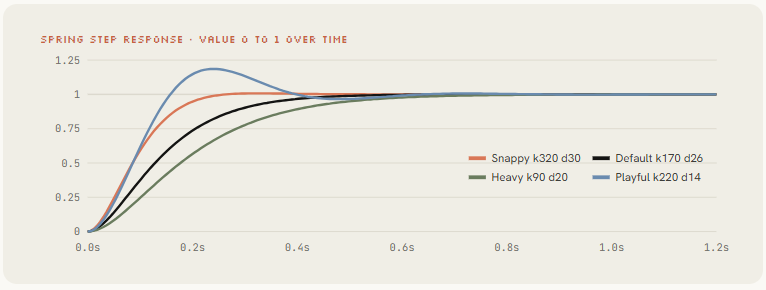
多数人漏掉的一点是,一个值要多次改变目标时(光标位置、容器宽度),不重启弹簧,每次变化各加一个从自己时刻开始的弹簧。运动保持连续,渲染第 812 帧也不需要先模拟前面 811 帧。
// Closed-form damped spring, 0 → 1. Pure function of time.
function spring(t, k = 170, d = 26) {
  if (t <= 0) return 0;
  const w0 = Math.sqrt(k), z = d / (2 * w0);
  if (z < 1) {
    const wd = w0 * Math.sqrt(1 - z * z);
    return 1 - Math.exp(-z * w0 * t) * (Math.cos(wd * t) + (z * w0 / wd) * Math.sin(wd * t));
  }
  return 1 - Math.exp(-w0 * t) * (1 + w0 * t);      // z >= 1 treated as critical
}

// keys: [[time, value], ...] sorted by time. Returns the value at t.
export function track(t, keys, k = 170, d = 26) {
  let v = keys[0][1];
  for (let i = 1; i < keys.length; i++)
    v += (keys[i][1] - keys[i - 1][1]) * spring(t - keys[i][0], k, d);
  return v;
}

// A tab indicator that stretches: leading edge is stiffer than trailing edge
export function indicator(t, stops) {
  const lead  = track(t, stops, 320, 30);
  const trail = track(t, stops, 140, 22);
  return { left: Math.min(lead, trail), right: Math.max(lead, trail) + 120 };
}

// Text inside a morphing box: in after the morph starts, out before the next one
export function swapAlpha(t, tIn, tOut) {
  return Math.min(clamp((t - tIn - 0.08) / 0.12), clamp((tOut - 0.1 - t) / 0.1));
}
四档参数按对象选:
| 档位 | 刚度 k / 阻尼 d | 用在 |
|---|---|---|
| Snappy | 320 / 30 | 按钮、开关、指示条的前沿 |
| Default | 170 / 26 | 卡片、容器、镜头 |
| Heavy | 90 / 20 | 大字、3D 物体、logo 定版 |
| Playful | 220 / 14 | 吉祥物、贴纸,过冲可见 |
已有的片子要换成弹簧,一句话就够:「把所有缓动曲线换成 lib/motion.js 里的闭式弹簧。UI 轻微过冲,文字不过冲。有多个目标的值一律用 track()。」Opus 能一次重构整份文件。
声音:让画面落在拍子上
Rob Hallam 起初以为那条片子的音频是后期加的,后来才知道声音也出自同一次生成。oozn 的乔布斯传记动画在 Node 里合成了配乐,每个剪辑点都锁在 120 BPM 上;Vox 的「small print」用 Python 合成音乐,再逐秒对着它打磨画面。声音是「AI 视频」开始像一部片子的地方。
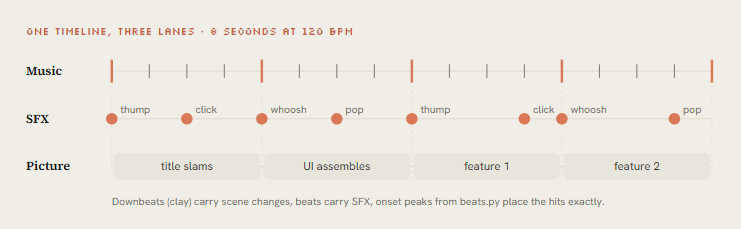
两条路。自带音轨就测量它;没有音轨,就在和画面同一条时间轴上合成。测量用 librosa,把节拍、强拍和起音峰值写进 beats.json,动画读这个文件:
# python beats.py song.wav > beats.json   (the animation reads this file)
import sys, json, numpy as np, librosa
y, sr = librosa.load(sys.argv[1], sr=None, mono=True)
tempo, frames = librosa.beat.beat_track(y=y, sr=sr, units="frames")
beats = librosa.frames_to_time(frames, sr=sr).round(3).tolist()
onset = librosa.onset.onset_strength(y=y, sr=sr)
peaks = librosa.util.peak_pick(onset, pre_max=3, post_max=3, pre_avg=3,
                               post_avg=5, delta=0.5, wait=10)
json.dump({
    "bpm": float(np.atleast_1d(tempo)[0]),
    "beats": beats,                                   # state changes go here
    "downbeats": beats[::4],                          # big moments go here
    "hits": librosa.frames_to_time(peaks, sr=sr).round(3).tolist(),  # SFX go here
}, sys.stdout, indent=1)
强拍放换场,普通拍放状态变化,起音峰值放音效。downbeats 取每四拍一个,前提是 4/4 拍且第一个检测到的拍正好是强拍,导出后听一遍确认。音效可以在 Node 里用几行公式合成:click 是 1800 Hz 正弦快速衰减,pop 是上扫频,thump 是下扫低频,whoosh 是带包络的噪声。全部用固定种子,和画面一样每次渲染结果一致。
自检回路:让 Opus 看自己的帧
Opus 5.5 能读图片,所以它能检查自己渲染出来的东西。原文认为,刷屏的片子和发出来自嘲「有点平庸」的片子,主要差在这一个习惯上。mablesjoseph 的 45 秒水彩短片坦白讲了代价,一共用了 6,270 万 token(96% 是缓存读取),调用模型 163 次,按 API 标价约 34 美元,耗时将近七个小时。从 Drew 发布当天那条 170 万观看的片子里,也能看出清理过好几轮。迭代就是方法本身。
先生成可供检查的材料:
# Contact sheet: 2 frames per second, 6 across
ffmpeg -i out/final.mp4 -vf "fps=2,scale=270:-1,tile=6x5" -frames:v 1 out/contact.png
# Strip: 12 consecutive frames around a fast action at 4.2s (catch pops and overlaps)
ffmpeg -ss 4.1 -i out/final.mp4 -vf "scale=320:-1,tile=12x1" -frames:v 1 out/strip.png
# Phone test: how it reads at 360 px wide
ffmpeg -i out/final.mp4 -vf "fps=1,scale=360:-1,tile=5x3" -frames:v 1 out/phone.png
# Loop check: play it twice back to back and watch the seam
ffmpeg -stream_loop 1 -i out/final.mp4 -c copy out/loop_check.mp4
# Determinism check: render twice, compare hashes
node render.mjs --dur 5 --fps 60 --sub 1 && md5 out/silent.mp4
每种材料抓一类问题。联系表看整体节奏和构图是否单调;连续 12 帧的条带抓快速动作里的跳变和重叠;360 px 宽的缩略图检查手机上字能不能读;循环检查看接缝处有没有卡顿;哈希检查确认渲染确定,否则后面「只重渲染受影响的几秒」就不成立。
然后让它评审:
Open out/contact.png, out/strip.png and out/phone.png and look at them properly.
Be a harsh motion director, not a proud author.

Score 1-10: hook in first 2s · readability at phone size · motion quality (springs,
no dead frames) · variety (new thing every 2-4s) · composition · brand accuracy · sound sync.

List the 3 biggest problems with timestamps. Hunt specifically for: text overlapping during
swaps, anything sliding instead of easing, corner labels and frame borders, centered-on-gradient
shots, blurry scaled text, a dead beat with nothing happening, a stutter at the loop seam.

Fix them, re-render only the affected seconds, show me the new contact sheet and new scores.
这段提示词有三处设计。「严厉的动效导演,不是骄傲的作者」给评审换了立场,模型自评时容易护短。每次只修最差的三个问题,避免一轮改太多又引入新问题。问题要带时间戳,修完只重渲染受影响的秒数,迭代成本才压得住。
交付:多画幅、技能、服务
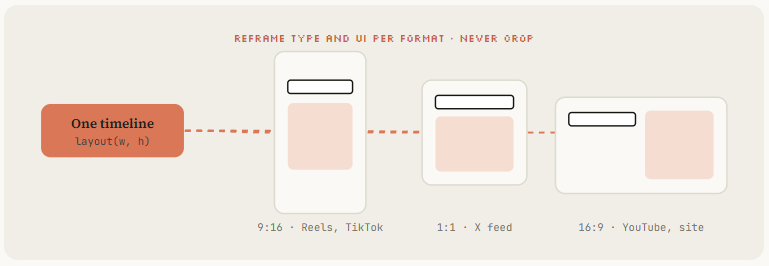
一条时间轴出所有画幅。 场景按布局函数写,不写死像素,让 Opus 并行渲染 9:16、1:1 和 16:9。每个画幅重新安排文字和 UI,不要把 16:9 直接裁成竖版。
把管线打包成技能。 整套流程收进一个 /motion-reel 技能后,下一条视频只需要一句话:「/motion-reel 给 [URL] 做 20 秒竖版,参考 ./refs/frame.png」。
---
name: motion-reel
description: Make a product or showreel motion video rendered from code. Use when the
  user asks for a launch video, showreel, product reel, animated explainer or motion ad.
---
# Motion reel

## Inputs to collect first
Product + URL, duration, formats (9:16 / 1:1 / 16:9), brand colors + fonts,
a reference (frame, video or image folder), music (file or "synthesize").

## Pipeline
1. Gather assets from the URL with Playwright into ./assets. List them.
2. If a reference exists, write docs/style_guide.md from it.
3. Measure or synthesize music. beats.py → beats.json.
4. Write docs/shotlist.md on the beat grid. Show it and wait for OK.
5. Build index.html with window.seek(t) using lib/motion.js springs. Follow CLAUDE.md.
6. Contact sheet → critique-pass (see prompts/critique-pass.txt) → fix. 3 rounds minimum.
7. node render.mjs → sfx.mjs → mix to -14 LUFS → out/final.mp4, all formats.
8. Deliver final.mp4, contact.png, poster.png. Say what you'd improve next.

## Hard rules
- Real product UI only. Never invent screens.
- No Math.random, no timers, no CSS transitions in render mode.
- Banned: corner labels, centered title on gradient, everything fading in.
响度和编码按平台定。 -14 LUFS 是流媒体平台的行业惯例,YouTube 官方编码页并没有写响度数字;广播标准是 EBU R128 的 -23 LUFS。营销片混到 -14 LUFS,讲解片模板用 -16 LUFS、真峰值 -1.5 dBTP,给旁白留出余量。数字要实测,只写进提示词不算数。ffmpeg 的 loudnorm 滤镜按 EBU R128 工作,默认目标是 -24 LUFS,必须显式传参,而且要跑两遍,第一遍测量,第二遍把测得的值回填,单遍模式会用动态压缩,听感变平。
# Pass 1: measure
ffmpeg -i out/mix.wav -af loudnorm=I=-14:TP=-1:LRA=11:print_format=json -f null -
# Pass 2: apply, feeding back measured_I / measured_TP / measured_LRA / measured_thresh / offset
ffmpeg -i out/silent.mp4 -i out/mix.wav -map 0:v -map 1:a -c:v copy \
  -af loudnorm=I=-14:TP=-1:LRA=11:measured_I=...:measured_TP=...:measured_LRA=...:measured_thresh=...:offset=...:linear=true \
  -ar 48000 -c:a aac -b:a 192k -movflags +faststart out/final.mp4
loudnorm 内部会把音频上采样到 192 kHz,所以要加 -ar 48000 采回来。-movflags +faststart 把 moov 信息放到文件头,网页里点开就能播,这也是 YouTube 推荐的编码设置之一,同一页还列了 H.264 High Profile、4:2:0 色度采样和 48 kHz 的 AAC-LC 音频。
无障碍按 WCAG 查。 普通文字对比度至少 4.5:1,18pt 以上或 14pt 以上粗体的大字至少 3:1(WCAG 1.4.3)。任意一秒内闪烁不超过 3 次(WCAG 2.3.1),快切和闪白的片头最容易踩线。网页上嵌入的动画要响应 prefers-reduced-motion: reduce,导出视频则另出一版减弱动效的剪辑。
卖成服务。 achxvi 同一周就开始接单,报价里有音乐和任意风格的吉祥物,片子讲产品功能,片尾放优惠,语言不限,最多改三次。Tony Dinh 一年前为类似视频付了一千多美元,现在一个技能加一套自检回路,一个下午就能交付。
常见误判
- 把一句话提示词当成方法。 它只能证明环境能跑。几百人用同一句话,得到的是一批彼此相似的 reel。
- 没给参考就开始动画。 结果几乎一定是居中标题、渐变背景、全部淡入。先给一帧、一段视频或一个图库。
- 让模型凭想象画产品界面。 先用 Playwright 抓真实截图、logo 和配色,列出素材清单再动画。
- 在渲染模式里留着 CSS 过渡、定时器或
Math.random。 两次渲染结果不同,局部重渲染和哈希检查都会失效。 - 用缓动曲线串联多次变化。 每次重启缓动,运动会在目标切换处断开。用每次变化叠加一个弹簧的写法。
- 配乐最后再加。 画面没落在拍子上,靠后期对齐要返工。先有
beats.json,再排状态。 - 没看过帧就交付。 联系表、条带、手机缩略图、循环接缝、哈希五项检查跑完,再给人看。
- 16:9 裁成竖版。 文字和 UI 会被切掉或挤到边上,每个画幅都要按布局函数重新排版。
- 把真实 API key 写进提示词。 提示词常被截图分享,key 放
.env,提示词里只写变量名。
可以直接拿来用的仓库
- JohnHeibel/PDoomVideo:MV《I’m Upping My P(doom)》的完整源码,README 写明全部由模型生成,
STORYBOARD.md、ANIMATION_GUIDE.md和render.mjs都在,适合看长片怎么拆章节。 - JohnHeibel/ClaudeAnimationBase:从 PDoom 拆出来的手绘卡通起步包。
- buildwithhanif/claude-animation-skill:Node canvas 手绘动画插件,不依赖浏览器。
- heygen-com/hyperframes:HTML + GSAP 框架,Apache 2.0。
- Remotion agent 技能:React 框架,注意公司授权条款。
- WinterArc21/Battle-of-Austerlitz-Film:长篇历史片的例子。
- guanmo-ai/awesome-ai-motion:约 580 件作品、83 个公开提示词、27 个附源码的案例,作品未经独立复现。
- athemeroy/awesome-opus-5-5-videos:从 X 收集的约 1,400 条视频,168 条经人工审阅,按 7 条制作路径分类。README 反复提醒,帖子里的「一次成功」「一句提示词」不等于核实过的运行记录。
读这些数据集时要记住,有人说两句话就一次生成,比如 Adish Jain;也有人把 163 次调用摊开来讲。转发量高的片子背后用了多少轮,帖子里通常看不到。
一句话提示词能出一条片子,harness 才能撑起一个工作室。装好环境,找一个参考,写出状态清单,自己掌握 seek(t) 引擎,让 Opus 反复看自己的帧直到每项 8 分,最后把流程打包成技能,以后就不用再写那份长提示词了。